These settings are the sixth step in getting NEO Planner up and running.
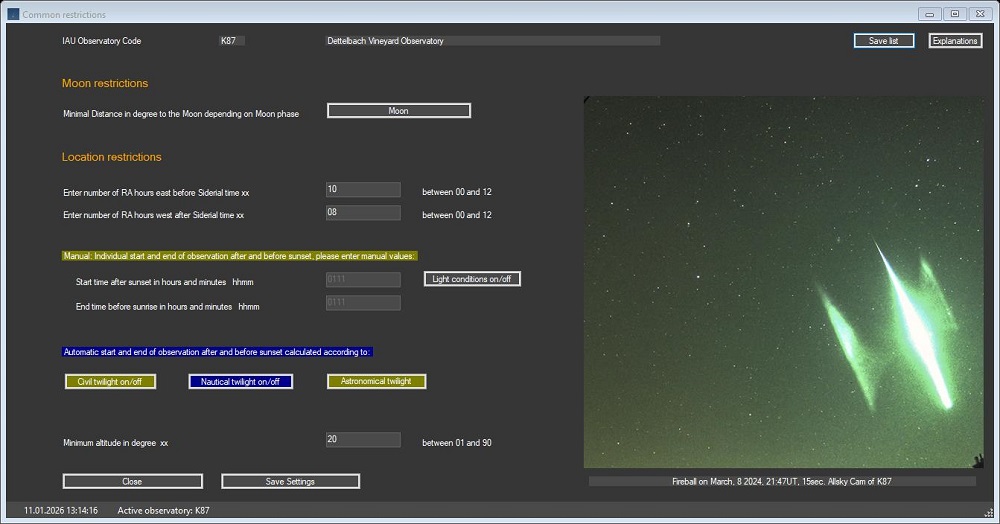
Here you define some general constraints for the planning process.
These settings are primarily used to define the observable area in all directions from the observatory location, including self-defined lunar distances.
One should keep an eye on a horizon that is not too deep, even if the observatory allows this.
A full range from R.A. 12 east and west of the meridian makes it difficult for the program to determine the best observation time for all objects,
which is calculated based on the altitude of the nocturnal ephemeris.
So you should generally choose an area that is about 8-10 R.A. hours east or west of the meridian on midnight or more precisely, of the siderial time.
This range can be increased to a greater extent if one carefully checks the results of the calculations for correct chronological order.
Plausibility checks or actions are usually only carried out after leaving the cursor in the input field.
go to top
Moon restrictions
NEO Planner Moon restrictions
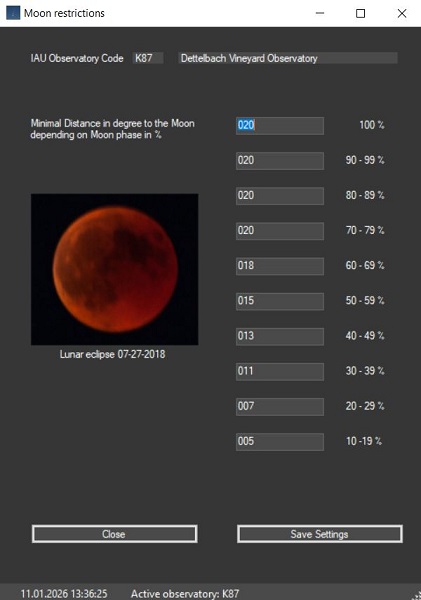
NEO Planner Moon restrictions settings screen
In contrast to deep sky photographers, the moon does not represent a real obstacle for observers of near-Earth objects.
Nevertheless, observation too close to our companion often leads to unusable images.
This is especially true for moon phases around 100%.
In this window you have the option to set the distances between the objects and the moon depending on the phase based on your own experience.
Neo Planner then sorts out the objects whose positions are too close to the moon by the entered number of degrees during the night.
Experience has shown that when planning for moonlight, you should also set the maximum brightness of the objects lower. look here how to control the brightness of the objects
Enter the RA hours which objects should be observed east of sidereal time depending on the nature of the horizon.
It should be noted that the starry sky moves from the east through the meridian during the night.
Therefore, the RA hours east before Siderial time should be entered generously depending on the visible horizon and seasons.
If the value is too small, there is a risk that objects that come close to the meridian during the night will not appear in the planning!
RA hours west after Siderial time
Enter the RA hours which objects should be observed west of sidereal time depending on the nature of the horizon.
Within this observation window, western objects are included in the planning during the evening hours.
go to top
Twilight end after sunset
Light conditions on/off:
Display of the light conditions via a list box. At higher latitudes in the hemispheres, reduced data is shown around the time of the summer solstice and missing astronomical time.
The twilight end and start times in the period between sunset and around nautical twilight should be adjusted to the seasons.
With this setting you define the time span between sunset and the start of the observation.
Since the start of the observation is based on individual experiences and preferences, enter the time span here yourself.
This can change during the year, depending on the location of the observatory.
For K87 on 50 degree northern latitude, I start the observation according to the sensitivity of my CCD camera, when nautical dusk is reaching MPSAS ~ 20 mag.
I then adjust the time span in the course of the year according to the seasons.
A distinction is made between manual input and automatic calculation according to twilight types.
The values for the distance between sunset or sunrise and the start or end of the observation should be entered mandatorily,
regardless of whether you select automatic calculation of the distances.
Since the automatic valuesof the twilight types are loaded via JPL interfaces, the manual values are used if JPL does not provide twilight data.
This is the case when there is no astronomical twilight due to the time of year. In this case, NEO Planner uses the manual inputs when planning.
Twilight start before sunrise
With this setting you define the time span between the last observation of the night and sunrise.
Since the end of the observation is based on individual experiences and preferences, enter the time span here yourself.
This can change during the year, depending on the location of the observatory.
For my observatory K87 on 50 degree northern latitude, I end the observation according to the sensitivity of my CCD camera, when nautical dusk is reaching MPSAS ~ 20 mag.
I then adjust the time span in the course of the year according to the seasons.
MPSAS - Magnitude per Square Arc Second - explanation
go to top
Automatic start and end of observation after and before sunset
Depending on whether the buttons are activated, the start time of the planning after sunset is automatically determined based on the selected twilight types.
The selected type is shown in dark blue, the inactive types in olive. Each type of twilight can be switched on and off. If no type of twilight has been selected,
the manual values will be used during planning. It is therefore essential that you enter the manual values.
I recommend entering the offsets manually and then selecting "nautical twilight on" for automatic calculation.
Minimum altitude ALT in degree
The minimum height above the horizon depends primarily on experience as to which objects can reasonably be observed above the horizon with the equipment.
Near Earth Objects in particular require a high quality survey, so a generous degree value should be preferred.
Neo Planner then selects those objects which reach the specified height when crossing the meridian.